Win11 24H2更新后遇到PcaWallpaperAppDetect错误的修复教程
Win10d 5 月 30 日最新消息,许多用户反映自己将系统更新到Windows 11 24H2预览版后,系统突然跳出PcaWallpaperAppDetect错误,这样会影响用户正常使用电脑,但不清楚要怎么操作才能解决?以下小编给大家介绍此错误的修复教程步骤。

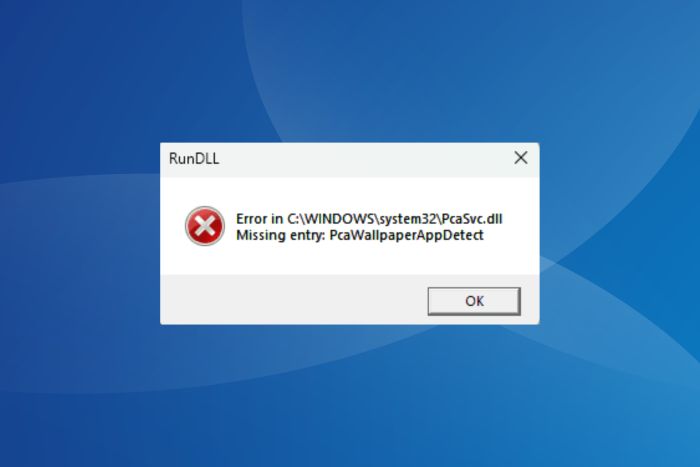
Win10d附上错误消息如下:
Error in C:\WINDOWS\system32\PcaSvc.dll
Missing entry: PcaWallpaperAppDetect
在微软支持论坛上,不少升级到 Windows 11 24H2 的用户反馈遇到这个问题:
Error in C:\WINDOWS\system32\PcaSvc.dll
Missing entry: PcaWallpaperAppDetect
Error in C:\WINDOWS\system32\PcaSvc.dll
Missing entry: PcaWallpaperAppDetect
Error in C:\WINDOWS\system32\PcaSvc.dll
Missing entry: PcaWallpaperAppDetect
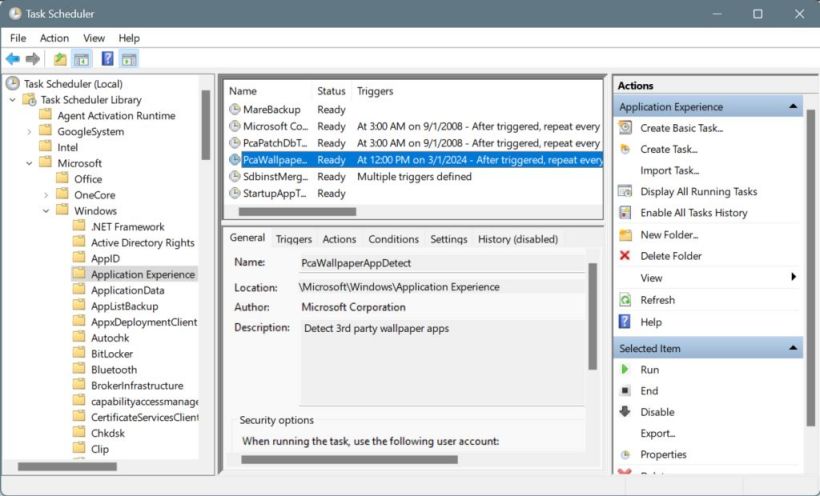
根据 Windows Insider Dypsis 的说法,该错误是由任务调度程序中的 PcaWallpaperAppDetect 任务触发的,删除该任务就能修复该错误。
PcaWallpaperAppDetect 任务可在以下路径中找到:
01Task Scheduler Library\Microsoft\Windows\Application Experience
相关阅读:
快来安装体验:Win11 24H2专业版更新包,附新功能介绍
相关文章
- Mozilla 怒批 Win11 26H2 备份机制!换机后强制变回 Edge
- 微软优化 Win11 的 Linux 子系统!补齐虚拟化资源调度短板
- 桌面端最强原生 Win11!专业工作站版详解
- C 盘空间莫名被吃光!微软确认 Win11 权限日志 Bug
- 五年呼声终落地!Win11 迎加强版 Win10 风格小任务栏
- 微软正式确认 Win11 26H2 10 月发布!24H2 同步停更
- Win11 破除 NPU 硬性门槛!RTX30 全系 6GB 显存即可运行本地 AI
- Win10 份额持续下滑!Steam 近七成玩家用上 Win11
- 微软 Win11 RP 22631.6132(KB5067112)预览版发布!附下载
- 微软向所有符合条件的 PC 设备推送 25H2 版本
- Win11 十月更新 KB5066835 曝多故障:安装报错、WinRE 键鼠失灵
- Win11 25H2 体验大升级:Copilot 更聪明,右键菜单召唤 AI 干活
- 微软推送 Win11 24H2 / 25H2 10 月累积更新补丁 KB5066835
- 微软Win11 Canary 预览版 27971 来了!附完整的更新日志
- 微软推送 Win11 23H2 10 月累积更新补丁 KB5066793
- Win11 23H2 家庭 / 专业版 11 月停服,商业版可多撑一年


