Win10系统更新时出现0x80242fff错误代码怎么办?
最近有用户进行执行Win10系统更新的时候,出现0x80242fff错误码,有一个更新无法执行,如下图所示,那么Win10系统更新时出现0x80242fff错误代码怎么办?该如何解决呢?
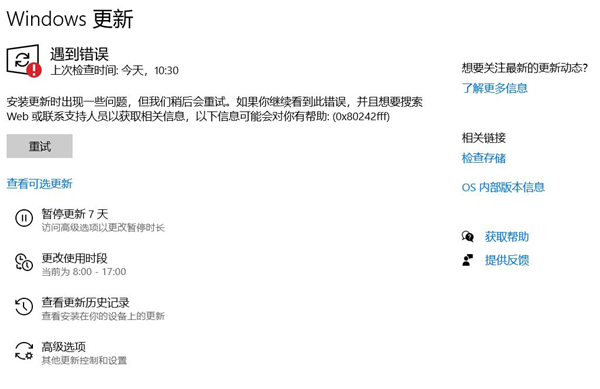
Win10系统更新时出现0x80242fff错误代码怎么办?
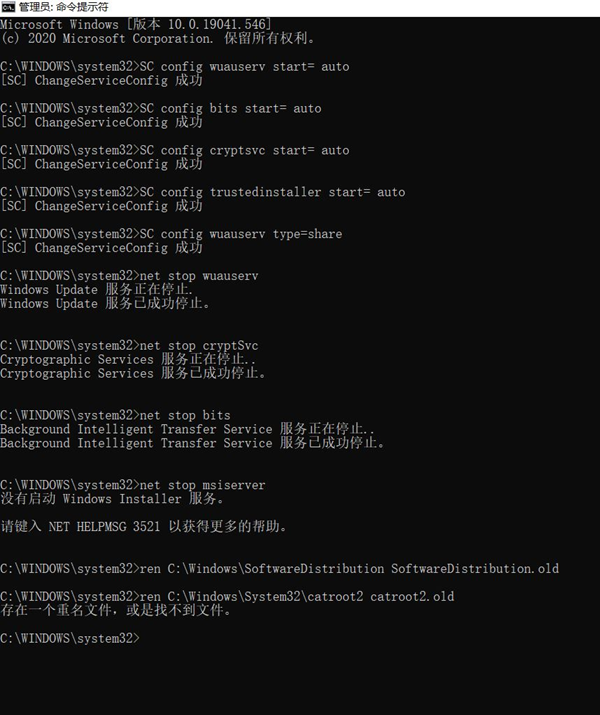
1、左下角搜索cmd,之后以管理员权限打开;
2、输入以下命令;
- 01SC config wuauserv start= auto
- 02SC config bits start= auto
- 03SC config cryptsvc start= auto
- 04SC config trustedinstaller start= auto
- 05SC config wuauserv type=share
SC config wuauserv start= auto
SC config bits start= auto
SC config cryptsvc start= auto
SC config trustedinstaller start= auto
SC config wuauserv type=share
3、然后输入;
- 01net stop wuauserv
- 02net stop cryptSvc
- 03net stop bits
- 04net stop msiserver
- 05ren C:\Windows\SoftwareDistribution SoftwareDistribution.old
- 06ren C:\Windows\System32\catroot2 catroot2.old
- 07net start wuauserv
- 08net start cryptSvc
- 09net start bits
- 10net start msiserver
net stop wuauserv
net stop cryptSvc
net stop bits
net stop msiserver
ren C:\Windows\SoftwareDistribution SoftwareDistribution.old
ren C:\Windows\System32\catroot2 catroot2.old
net start wuauserv
net start cryptSvc
net start bits
net start msiserver
4、之后,重新启动一下。
相关文章
- 在Win10系统上如何找到UEFI?找到UEFI的操作流程
- win10自带记事本不见了的解决方法
- 小白轻松学会Win10重装过程 石大师U盘重装Win10系统
- 解决Win10系统联想笔记本电池60%就不充电了的设置方案
- 能够修复Wacom设备未连接Win10系统的三种方法
- Win10系统设置安全中心不扫描某个文件夹的操作方法
- Win10系统Edge主页被其它网址网页劫持篡改的解决方法
- 小白如何重装Win10系统?系统之家镜像重装Win10系统
- win10电脑桌面不显示任何东西的解决方法
- win10 21H1老机专用精简版只占1g下载
- win10天气预报设置到桌面教程
- win10系统远程桌面无法连接的解决方法
- win10脱机使用打印机怎么解决?
- win10系统蓝屏终止代码driver的解决方法
- windows10系统投影仪设置教程
- win10系统dns配置错误网页打不开的解决方法


