Win7垃圾批处理器的编辑方法
电脑使用一段时间后,垃圾文件就会变多,下面给出的是清理垃圾文件的方法!
1、新建一个txt文本文件;
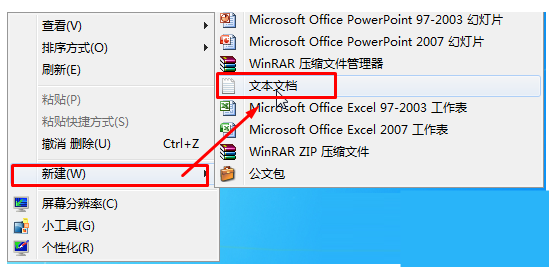
2、打开文本文件,输入以下内容:
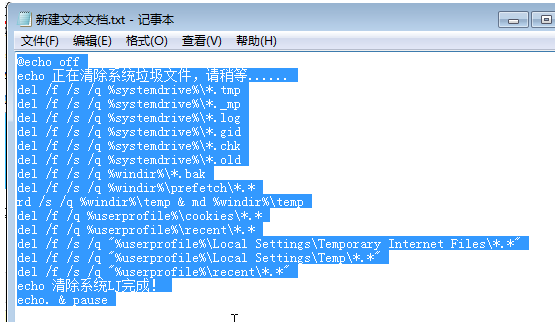
@echo off
echo 正在清除系统垃圾文件,请稍等......
del /f /s /q %systemdrive%*.tmp
del /f /s /q %systemdrive%*._mp
del /f /s /q %systemdrive%*.log
del /f /s /q %systemdrive%*.gid
del /f /s /q %systemdrive%*.chk
del /f /s /q %systemdrive%*.old
del /f /s /q %windir%*.bak
del /f /s /q %windir%prefetch*.*
rd /s /q %windir% emp & md %windir% emp
del /f /q %userprofile%cookies*.*
del /f /q %userprofile%ecent*.*
del /f /s /q "%userprofile%Local SettingsTemporary Internet Files*.*"
del /f /s /q "%userprofile%Local SettingsTemp*.*"
del /f /s /q "%userprofile%ecent*.*"
echo 清除系统LJ完成!
echo. & pause
3、点击“文件”--“文件另存为”,文件名的结尾从txt改为bat,保存类型选择“所有文件”;
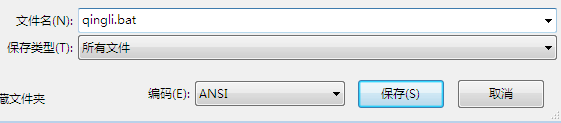
右键保存出来的bat文件,以管理员身份运行即可。
相关文章
- Win7实现远程关机的具体步骤
- Win7电脑要求的函数不受支持怎么解决?
- 怎么关闭Win7电脑UAC功能?教你一招轻松关闭Win7UAC功能
- Win7纯净版系统打开应用程序出现闪退是怎么一回事?
- Win7把pdf打印机删除了如何添加回来?
- 怎么解决Win7换不了桌面壁纸?Win7换不了桌面壁纸解决方法
- 怎么开启Win7快速启动栏?Win旗舰版快速启动栏操作方法
- 为什么Win7系统鼠标经常停顿一下?Win7系统鼠标经常停顿解决方法
- Win7纯净版开机卡在欢迎界面后黑屏怎么回事?
- 为什么Win7系统打不开软件?Win7系统打不开文件解决方法
- Win7 64位旗舰版使用photoshop时提示没有足够内存怎么办?
- Win7系统识别不了中文WIFI怎么办吧?
- win7系统tcpip.sys蓝屏修复方法
- win7系统电脑前面没有声音怎么办?
- Win7进入dos界面的操作教程
- Win7桌面文件名变蓝色的解决教程


